
Best ERP For Small Business (SMBs) In the UK
Shortlist small business ERP that meets your scalability, budget, & integration needs to replace your team’s spreadsheets and disconnected tools.
What Do You Need A Small Business ERP Software For?
How SMBs Benefit From Implementing ERP for Small Business
A small business ERP system is enterprise resource planning software built for SMBs and SMEs with roughly 20 to 100 users, bringing accounting, inventory, sales, CRM, and purchasing into one connected system instead of scattered spreadsheets and standalone apps.
If your business has outgrown spreadsheets, you already know the cost. Data lives in three places, none of them agree, and someone loses Friday afternoon reconciling them. A small business enterprise resource planning (ERP) system fixes that. It holds your operational data in one place and automates the manual input that eats your team’s time.
Small business ERPs deliver the same outcomes as enterprise-grade tools: better collaboration, productivity, and efficiency. The difference is that they do it in an agile, cost-effective, and user-friendly way. You get the result without the enterprise overhead.
Three factors qualify an ERP as genuinely SMB-ready rather than an enterprise system in disguise:
- It migrates your data from spreadsheets and SMB accounting tools without a painful re-entry project.
- It is quicker to implement than a tier 1 suite, so you see value in weeks, not years.
- It is simpler to run and needs minimal training, which matters when you do not have a dedicated IT team.
The best SMB solutions concentrate on the core modules a smaller business actually uses: accounting, inventory, sales, CRM, and purchasing. They skip the tier 1 suite of modules you will never switch on. That focus is what keeps them affordable and fast to deploy.
How Much Should SMBs Budget for ERP
Small business ERP typically costs £100 to £200 per user per month, which works out to roughly £2,000 to £15,000 in total cost of ownership (TCO) a year depending on your user count. Cloud-based systems sit at the lower end and carry far less upfront cost than on-premise alternatives.
These figures apply to tier 2 cloud-based ERP systems, which the majority of SMBs (around 55%) choose over hosted or on-premise options. The total cost of ownership for cloud ERP runs 20 to 30% below an equivalent on-premise system. That gap comes from minimal upfront capital expenditure (CapEx) and lower ongoing operational expenses (OpEx). Independent five-year analyses put the saving higher still, commonly 30 to 50%, so treat 20 to 30% as a conservative floor.
Expense | Type | Avg. cost |
Software subscription (per user per month) | Ongoing | £20 – £200 |
Upgrades and maintenance | Ongoing | Included – £0 |
Integrations | Ongoing | Included – £0 |
Modules (basic suite) | Ongoing | Included – £0 |
Implementation | Upfront | £8,000 – £25,000 |
Existing data migration | Upfront | £1,000 – £5,000 |
Customisation | Upfront | £2,000 – £10,000 |
Training | Upfront | £0 – £5,000 |
Implementation consultant (fixed rate) | Upfront | £1,000 – £15,000 |
When you compare vendors on cost, compare total cost of ownership, not the headline per-user price. A low monthly figure can hide setup, migration, and customisation charges that a fuller-priced competitor includes as standard. Ask each vendor two questions before you rank them on price: what is bundled, and what is billed separately? Upgrades, integrations, and the basic module suite are often included with cloud ERP.
Quick implementation and lower CapEx mean most SMBs see a return on their ERP investment within 2.5 years.
Best ERP for Small Business Solutions
Enapps
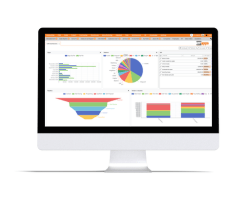
A customisable ERP for small and medium-sized businesses, with particular strength in bespoke manufacturing, construction, and distribution.
Best for size: 10 to 100 employees
Best for industry: Bespoke manufacturing, construction, and distribution
Pricing: From £77 per user/month; core modules from £550/month
Implementation time: 4 weeks to 9 months
Cloud-based? Yes, browser-based and usable on desktop, laptop, tablet, and mobile
Oracle NetSuite
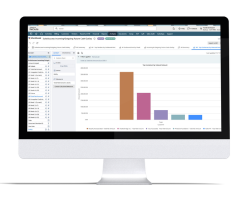
A long-standing, AI-powered cloud ERP suite covering financials, inventory, CRM, HR, and ecommerce on a single unified platform.
Best for size: Small to large businesses
Best for industry: Industry-agnostic (used across a wide range of sectors)
Pricing: From £15,000
Implementation time: 24 hours to 4 weeks
Cloud-based? Yes, and usable on desktop, laptop, tablet, and mobile
Flowlens
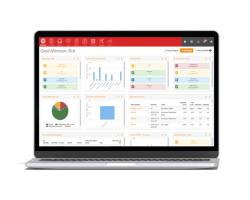
A combined MRP, service management, and CRM solution for SMEs, built to consolidate the entire build-to-order and after-sales lifecycle.
Best for size: 5+ users
Best for industry: Original equipment and device manufacturing (also equipment reselling, parts and materials supply, and industrial machinery)
Pricing: From £39 per user/month; core subscription from £239/month
Implementation time: 4 weeks to 3 months
Cloud-based? Yes, and usable on desktop, laptop, tablet, and mobile
Statii
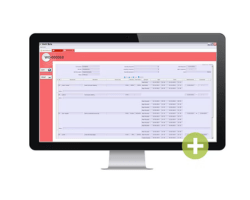
A customisable, cloud-based MRP/ERP for SME manufacturers, handling everything from front-of-house customer and supplier documents to shop-floor production management.
Best for size: Fewer than 50 employees
Best for industry: Manufacturing (metal, wood, plastic), industrial machinery, and engineering
Pricing: From £64 per user/month (based on a 3-user system)
Implementation time: 7 days to 4 weeks
Cloud-based? Yes, and usable on desktop, laptop, tablet, and mobile
Odoo
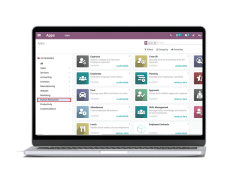
A modular, open-source suite of integrated business apps covering accounting, CRM, sales, inventory, manufacturing, POS, eCommerce, and HR.
Best for size: Micro and small businesses (roughly 1 to 50 employees)
Best for industry: Industry-agnostic
Pricing: Free one-app plan; Standard from £19 per user/month; Custom from £37 per user/month (billed yearly)
Implementation time: 1 to 3 months
Cloud-based? Yes, with on-premise hosting also available
What Do You Need A Small Business ERP Software For?
Cloud vs On-Premise: What Type of ERP Is Best for Small Businesses
For most small businesses, cloud ERP is the better choice, because it removes the upfront hardware cost, deploys faster, and needs no in-house IT team to keep it running. On-premise still has a place, but it is now the exception for SMBs rather than the default.
Cloud ERP, also described as cloud-based, web-based, or online ERP, means the system is hosted by the vendor and you access it through a browser. You pay a subscription, the vendor handles servers, security, and updates, and your team logs in from anywhere. Around 55% of SMBs now choose this model.
It helps to separate three options:
- Cloud (SaaS): the vendor hosts and maintains everything; you subscribe per user. Lowest upfront cost, fastest to deploy.
- Hosted: your ERP runs on a third party’s servers but is still managed largely by you. A middle ground, often a stepping stone from on-premise.
- On-premise: you buy licences and run the software on your own hardware. Highest control, highest upfront cost, and the most IT burden.
The cost case for cloud is straightforward. You swap a large capital outlay for a predictable monthly subscription, and total cost of ownership lands 20 to 30% below on-premise on the conservative figure (independent five-year studies often show 30 to 50%). Cloud also implements faster, which lowers your implementation cost and brings your return forward.
On-premise can still make sense in three cases: strict data-residency or compliance rules that require systems on your own infrastructure, deep customisation a SaaS platform cannot accommodate, or an existing IT team and hardware you intend to keep. For the typical small business without those constraints, cloud wins on cost, speed, and simplicity.
How Long Does It Take to Implement ERP for Small Business
Small business cloud ERP implementation takes anywhere from 24 hours to 6 months, roughly 40% faster than a traditional on-premise project. Larger or heavily customised rollouts can run to two years. A focused SMB deployment on a cloud model is often live in weeks.
Three factors set your timeline: how much data you migrate from spreadsheets, how much customisation you need, and how experienced your vendor is with businesses like yours. Keep all three lean and you stay at the fast end of the range.
If speed is your priority, compare vendors on their quoted go-live windows. The fastest SMB cloud systems quote from 24 hours to 4 weeks, while more configurable or manufacturing-heavy systems run longer because there is more to set up. Match the implementation window to how quickly you need to be operational.
A shorter rollout is not only a convenience. It also means a lower implementation bill, less operational disruption, and a faster return. That is why “quick to implement” and “low total cost of ownership” tend to travel together for SMB buyers.
One distinction is worth holding onto: implementation speed is not the same as ease of use. A system can go live quickly and still frustrate your staff day to day. SMB ERPs are generally simpler and need minimal training, but judge speed and usability separately. Test usability with a free trial before you commit.
How Long Does ERP Implementation Take for Midsize Companies?
Midsize ERP implementations typically take longer than small business rollouts, commonly three to nine months, because there is more data to migrate, more users to train, and more systems to integrate. Cloud delivery still compresses that timeline considerably against on-premise.
The clearest way to think about it is by employee band. A 50 to 250-employee business usually has a wider module footprint and more integration points than a sub-50 SMB, which pushes a typical cloud go-live toward three to six months. A 250 to 1,000-employee organisation adds more departments, more approval workflows, and often multi-site requirements. That can extend a cloud rollout toward six to nine months or beyond.
At this size, the factors that move the timeline most are data quality and volume, the number of integrations to existing tools, and the availability of your own people to support the project. Vendor experience with companies of your size matters more here than at the small end, where deployments are more standardised.
What Are the Risks of ERP Implementation For Small Teams?
75% of total ERP implementations end in failure due to delays, overruns, and poor communication. For small businesses, the resources put into finding and deploying the right solution increases the importance of implementation success.
To ensure successful rollout, SMBs need to be aware of implementation risks like:
- Operational downtime during implementation
- Budget overrun
- Underestimating complexity
- Inadequate staff training and vendor support
- Data migration errors
ERP and CRM Integration for SMBs
The best integrated ERP and CRM for a small business is usually one of two things: an all-in-one ERP with a native CRM module, or a strong ERP that connects cleanly to the CRM you already use. For most small teams without a dedicated IT function, native integration is the simpler and more reliable route. If you are still weighing whether the two systems should be separate at all, our guide to the difference between ERP and CRM sets out where each tool’s strengths lie.
You have two practical routes. An all-in-one ERP with built-in CRM keeps your sales, customer, and operational data in a single system, so there is nothing to connect and nothing to break. A best-of-breed approach pairs your preferred ERP with a separate CRM, which suits you if your sales team is committed to a CRM it will not give up.
SMB integration works through one of three mechanisms: APIs that let two systems exchange data directly, pre-built connectors the vendor maintains for common tools, or middleware that sits between systems and translates between them. Modern cloud ERPs make this far easier than legacy systems did. That is especially true for connecting accounting software, e-commerce platforms, and payroll. For a fuller breakdown of the methods, benefits, and risks, see our guide to ERP integration.
When you evaluate integration, look for a vendor with published integration partners or a connector marketplace. That tells you the connections you need already exist and are supported, rather than something you will have to build and maintain yourself. For a small team, that distinction is the difference between a working setup and an ongoing IT headache.
For most small businesses, native integration wins. Fewer moving parts means fewer points of failure, one support contact instead of two, and no middleware to babysit. Reserve the best-of-breed route for when a specific CRM is genuinely non-negotiable.
5 Considerations for Small Businesses When Choosing an ERP System
Choosing an ERP comes down to five practical questions. Work through them in order and you will have a shortlist that fits your budget, your sector, and the way your team actually works, rather than the most heavily marketed system.
1. What Should You Budget?
Start with the cost of doing nothing. Spreadsheets and disconnected tools have a real price: wasted hours, duplicated data, and decisions made on numbers that do not reconcile. Weigh that against the cost of ERP and the typical 2.5-year payback for SMB cloud systems. The aim is not the cheapest option. It is the one that pays for itself fastest. Remember that a small business cannot absorb a budget shock the way an enterprise can, so build in a margin for the upfront costs above and avoid stretching for a system you cannot comfortably fund through implementation.
2. What Are the Total Costs (Upfront, Subscription, and Long-Term)?
Compare total cost of ownership, not the headline per-user price. The number that matters includes subscription per user, implementation, data migration, customisation, training, integrations, and any annual price rises written into the contract. A cheaper monthly rate that excludes migration and training can easily cost more over three years than a fuller-priced competitor that bundles them. Use the cost-breakdown table above as your checklist, and ask every shortlisted vendor to itemise what is included as standard versus billed separately.
3. Does It Match Your Required Capabilities?
Shortlist by your core modules and your industry, not by feature count. List the modules you genuinely need: accounting, inventory, sales, CRM, and purchasing. Check each system against that list before anything else. Then weigh sector fit. A manufacturer needs shop-floor and MRP depth (if you are unsure how much, our guide to the difference between ERP and MRP is a useful starting point); a services or project-based business needs project accounting and resource planning. Resist the pull of enterprise complexity you will never use. Paying for tier 1 modules you never switch on is one of the most common and avoidable SMB ERP mistakes.
4. When Will It Be Up and Running?
Match the implementation window to how quickly you need to operate. Cloud SMB systems range from 24 hours to 6 months. The timeline is driven by data migration, training, any integration with legacy tools, and vendor availability. If speed is critical, favour faster go-live options and keep customisation to a minimum for the first phase. You can always add complexity once the core system is live and your team is comfortable.
5. Is It Easy to Use?
A system your team will not use is wasted money, however good it looks in a demo. Staff moving off familiar spreadsheets or legacy tools often resist a new system, so user-friendliness and minimal training are not nice-to-haves. They decide whether adoption succeeds. The cautionary tale is real: at Quality Material Handling, a lead salesman refused to use the company’s previous system because it was not user-friendly (see the case study below). Run a free trial with the staff who will use the system daily, and let their verdict carry real weight before you buy.
2 Real-World Small Business ERP Success Stories
1. Quality Material Handling x Acumatica
The Situation
Quality Material Handling had been relying on Sage 100 financial software alongside paper and spreadsheets for their inventory, invoicing, and sales operations.
As a result, accounting operations were months behind schedule, with a lead salesman refusing to use their Sage system as it wasn’t user-friendly.
The Results
The company deployed an SMB-focused ERP solution in Acumatica. This led to:
- Increased visibility across all operations
- Reducing reporting time from hours to minutes
- Improved inventory accuracy
- Lowered month-end closing to less than 11 days
- Eliminating paper and spreadsheets from all business functions
2. EcoBags Products x NetSuite ERP
The Situation
EcoBags Products struggled with manual processes and disconnected data. They manually managed sales, leads, and invoicing tasks. They also used multiple systems – QuickBooks, Mail Order Manager, and fulfilment – for different data types that didn’t communicate with each other.
The Results
The company implemented NetSuite ERP, a cloud-based solution that works excellently for small business operations. It enabled them to:
- Access data from anywhere at any time
- Receive a discount on their software licences
- Automate transactions by integrating an electronic data interchange (EDI)
ERP For Small Business FAQs
Which ERP Is Easiest and Fastest to Implement for Small Businesses?
Cloud-based ERP systems are the easiest to implement for small businesses and deliver a faster go-live time. They require no on-premise infrastructure and fewer customisations.
Implementation speed depends on three things: how much data you are migrating from spreadsheets, the number of customisations you need, and your vendor’s experience. To compare like-for-like, look at each vendor’s stated implementation window, the depth of its onboarding support, and whether it offers a phased rollout rather than a single switch-over.
What Is the Best ERP for Small Businesses?
There is no single best ERP for small businesses. The right system depends on your industry, your user count, and whether you make products or deliver services. The strongest small-business ERPs are cloud-based, designed for 20 to 100 users, quick to implement, and built to replace spreadsheets and disconnected accounting tools.
Rather than picking by brand, shortlist three or four vendors against your core modules, typically accounting, inventory, sales, CRM, and purchasing. Then compare implementation time, pricing, and support before deciding.
What Is the Best ERP for Small Business Accounting and Finance Needs?
The best ERP for small business accounting is a cloud-based system with built-in financial management, rather than a standalone bookkeeping tool. Look for ERPs that combine general ledger, invoicing, and reporting with inventory and sales data, so your finance numbers update automatically from across the business. Our roundup of ERP systems for accounting and finance goes deeper on what to look for.
What Is the Most Affordable ERP for Small Businesses?
Small-business ERP systems typically cost £100 to £200 per user per month, working out to roughly £2,000 to £15,000 total cost of ownership a year depending on user numbers. Cloud-based ERP is usually 20 to 30% cheaper than on-premise because there is minimal upfront capital cost.
To compare ERP vendors fairly on price, do not just look at the per-user subscription. Factor in the one-off costs too: implementation runs £8,000 to £25,000, data migration £1,000 to £5,000, customisation £2,000 to £10,000, and training up to £5,000. Ask each vendor what is included as standard, since upgrades, integrations, and basic modules often are, so you are comparing total cost of ownership rather than the headline monthly fee.
Who Offers the Best Integrated ERP and CRM for Small Businesses?
The best integrated ERP and CRM systems for small businesses combine sales, customer, and operational data in one platform, rather than syncing two separate tools. Modern cloud ERPs make this straightforward, with CRM included as a core module or connected through pre-built integrations and APIs.
For small teams without dedicated IT, native integration usually wins on cost and maintenance. If you go the integration route, choose a vendor with published integration partners to speed up setup and reduce risk.
What Is the Best ERP for Medium-Sized and Mid-Market Businesses?
The best ERP for medium-sized businesses is typically a tier 2, cloud-based system that scales beyond small-business limits without the cost and complexity of tier 1 enterprise software. These suit companies that have outgrown entry-level tools but do not need a full enterprise suite.
How Many Small and Mid-Sized Businesses Use an ERP System?
ERP adoption among SMBs continues to grow as cloud systems lower the cost and complexity barrier. Among small and mid-sized businesses that implement ERP, around 55% choose tier 2 cloud-based systems over hosted or on-premise solutions, drawn by lower upfront cost and faster implementation.
When Should a Small Business Move From Spreadsheets to an ERP System?
A small business should move from spreadsheets to an ERP when manual data entry, version-control errors, and disconnected tools start slowing the business down. Common triggers are outgrowing your accounting software, managing inventory or projects across multiple systems, and spending too long reconciling data by hand.
Spreadsheet upload features and import templates simplify data migration, and with dedicated support and batch migration, the process is relatively straightforward. The risk lies in data quality. Poor-quality data, mismatched fields, or inconsistent formatting all make migration trickier.
What Support and Training Do Small Businesses Need When Implementing ERP?
Efficient training and support are key to successful ERP take-up. For small businesses that may not have an IT team, this stage is crucial. When looking for an ERP small business solution, ensure the vendor provides support and training in the form of:
- In-person, on-site training
- Detailed documentation, knowledge base, and illustrations
- 24/7 chat support
- A phased implementation plan